
baby registry
in one minute!- Simple, quick and 100% free
- Add gifts from any store
- A cash fund for the bigger things
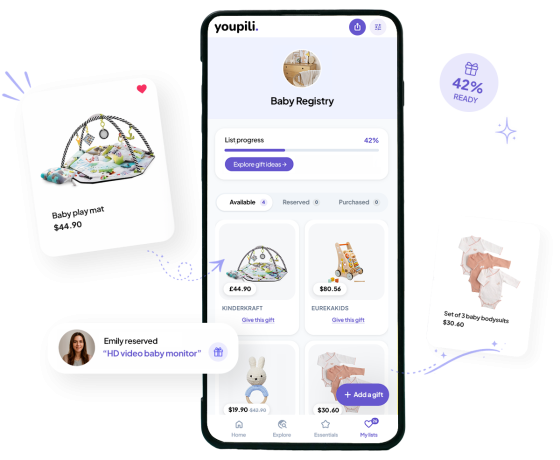
The baby registry for any store
A free universal baby registry, designed with parents in mind.
storefront
Any store, one registry
Add baby gifts from any online store – big names or small shops – and keep everything together in a single universal registry.
link
Paste a link, done
Copy a product link, paste it into your registry, and Youpili pulls in the product details for you. No link? Add the gift yourself.
bookmark_added
Reservations, not duplicates
Friends and family reserve a gift before they buy it, so nobody shows up with a second baby monitor.
volunteer_activism
A cash fund for the big things
Turn on the cash fund and let loved ones contribute any amount, free of charge. Say in your note for your guests what it is for.
All our guides to plan your registry
Clear answers for parents-to-be… and for their friends and family.
Discover the Youpili universal baby registry!
I start, simply.
In just a few clicks, you can add everything you need for your baby. Try Youpili first, then create a free account to save your registry and share it.

I add my favorite gifts.
I personalize my registry.
I share it with friends and family.

I follow reservations as they happen.
Received something outside the registry? Mark it as purchased yourself.

All your questions about the baby registry
Answers to the questions parents ask most.
What should I put on my baby registry?
Start with the essentials for the first months: sleep (a crib or bassinet, fitted sheets, sleep sacks), feeding, diapering (diapers, a changing pad), getting around (a stroller and a rear-facing infant car seat), clothes (bodysuits and sleepers) and bath time. Then add a few treats, at a range of prices.
When should I start my baby registry?
Many parents start during the second trimester: you have a clearer idea of what you need, and friends and family have time to choose – especially if a baby shower is planned. You can keep adding to it at your own pace.
How do I create a baby registry?
With Youpili, choose the baby occasion, tell us a little about your baby, then add gifts from any store by pasting a link – or add them yourself. Personalize your registry with a photo and a note for your guests, then share it.
How much should a baby registry cost?
Rather than a total budget, think about the mix: plenty of small and mid-priced gifts, plus a few big-ticket items that friends and family can go in on together. That way, everyone finds a gift that fits their budget.
How many items should I put on a baby registry?
There is no perfect number: plan a few more items than the number of people likely to buy a gift (including your baby shower guests), at a range of prices, covering the essentials for sleep, feeding, diapering, outings and bath time.
How do I avoid duplicate gifts on my baby registry?
On Youpili, friends and family reserve their gift before buying it: it then shows as reserved, and nobody buys it twice. If you receive something that was not bought through the registry, simply mark it as purchased.
What is a baby registry?
A baby registry is a list of the gifts you need to welcome your baby. You share it with friends and family – and your baby shower guests – so they know what to get. With a universal baby registry like Youpili, you add products from any store, loved ones reserve their gift in one click and you avoid duplicates.
It is free, and you can start without signing up.
Why make a baby registry?
A baby registry answers the question everyone asks: “What do you need?”. It avoids duplicates and unwanted gifts, offers ideas for every budget and means you get things you will actually use.
With Youpili, the registry is free, works with any store and is shared with a single link.
Do I need an account to make a baby registry?
Not to get started: with Youpili, you can start your registry without signing up, personalize it and add your first products. You then create a free account to save it and share it.
Friends and family do not need an account to view the registry or reserve a gift.
How do I share my baby registry?
Open your registry and tap “Share”: copy the link, send it by WhatsApp, email or Facebook, add the QR code to your baby shower invitations or birth announcement, or use your phone’s share menu. Friends and family open the registry in one click, with no account, and reserve the gift they are buying.
Can I add a cash fund?
Yes. Turn on the cash fund in your registry settings and friends and family can contribute any amount, in addition to or instead of a gift. The cash fund is free. Say in your note for your guests what the money will go toward.
Can my partner help manage the registry?
Of course. Turn on the option to build the registry together and invite your partner – or a grandparent – to add gifts and keep the registry up to date with you. Getting ready for your baby becomes a team effort.
Which shops can I add to my baby registry?
Youpili works with any online store, so you can mix and match your favorites:
- Baby and nursery specialists: strollers, cribs, car seats and everything for the nursery…
- Department stores and big online retailers: home goods, clothes, toys and everyday essentials…
- Small shops and eco-friendly makers: handmade, personalized or organic pieces…
When should I share my baby registry?
As soon as the essentials are on it – often in the third trimester, or a few weeks before your baby shower so the link can go out with the invitations. You can still edit the registry afterward: friends and family always see the latest version.
Can I change my baby registry after sharing it?
Yes, at any time: add, remove or swap gifts. Friends and family always see the up-to-date version when they open the same link.
Who can see my Youpili baby registry?
By default, only the people you send the link to can see your registry. If you wish, you can make it searchable in Youpili’s Find a registry search so friends and family can find it from the website. You also choose what is shown: your baby’s name, photo, note for your guests and shipping address.
Should I mix small and big gifts on my baby registry?
Yes: small gifts go quickly, and bigger items such as the stroller, crib or car seat can be bought by several people going in on them together.
What is the difference between a baby registry and a wishlist?
A baby registry is all about your baby’s arrival; a wishlist brings together wishes for any occasion. With Youpili, both work in exactly the same way.
Is an online baby registry really worth it?
Yes: an online registry keeps all your ideas together, is shared with one link and avoids duplicates, because each reserved gift is shown as reserved to everyone else.
What if an item on my registry is no longer available?
Replace it with a similar item, or suggest two close alternatives. You can edit your registry at any time, and friends and family always see the latest version.
Where can I find a good starting point for my baby registry?
Start from a list of newborn essentials, then adapt it to your home, the season and how you get around. A few must-haves, a few treats, and you are ready to share.